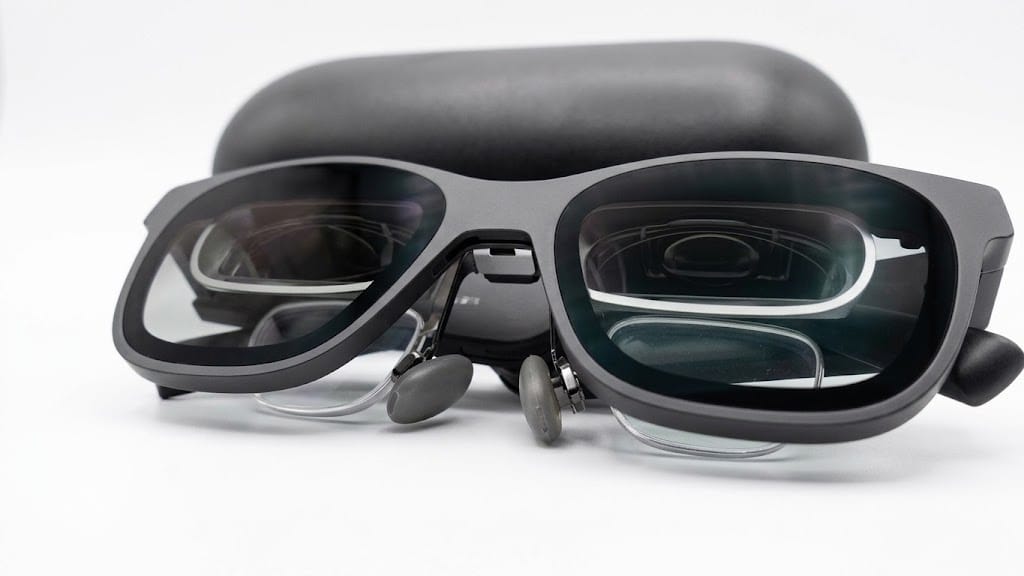
Note: This is an unaffiliated, honest review. I have no relationship with XREAL. I spent my own money on these glasses.
To save you some time, here is the quick, no-BS verdict on the XREAL Air 2 Pro AR Glasses: they represent a genuine generational leap in wearable display hardware compared to the heavy, clunky PCVR headsets of the past (like the original HTC Vive), shrinking a dual-display setup into a 75-gram pair of sunglasses you can run off your phone from the front seat of your car. But they are not an Apple Vision Pro killer—there are no onboard spatial cameras for true 6DoF world-anchoring, the 46-degree field of view (FOV) requires frequent head panning, extended heavy rendering can make the frame uncomfortably hot, and fine font rendering over wireless desktop streams will test your eyesight.
The Good vs. The Annoying
| The Good | The Annoying |
|---|---|
| ✓ Massive form-factor win: 75g sunglasses replace clunky 500g+ headsets and lighthouse trackers | ✗ No external SLAM cameras: Lacks true 6DoF spatial anchoring and depth sensing |
| ✓ Optical see-through: Maintain situational awareness and eye contact without camera latency | ✗ Narrow 46° FOV: Multi-monitor setups require turning your head to see peripheral windows |
| ✓ Excellent with Phone Desktop OS: Plug-and-play powerhouse with Samsung DeX / Android Desktop | ✗ Small text clarity: LAN wireless streaming and subpixel rendering cause font fuzziness in IDEs |
| ✓ Seamless prescription inserts: Custom optical frames snap in cleanly with zero eye-relief issues | ✗ Extended session thermals: Frame temples get noticeably warm under prolonged SteamVR load |
| ✓ Pocketable mobile workstation: Real productivity from a car trunk or coffee shop | ✗ Fragmented PC software: Requires hunting down third-party tools for stable virtual monitors |
| ✗ Rapid Phone Battery Drain: Driving dual Micro-OLED panels and video processing drains a phone quickly, requiring an external charge-and-play splitter adapter for long sessions. |
Why I Bought Them (And What They Actually Do)
I bought the XREAL Air 2 Pro for a specific purpose: a completely portable workstation with the ability to have multiple monitors when on the go. When you’re working on the go—whether sitting in your car, traveling, or working remotely without a desk—hauling external portable monitors is clunky.
Years ago, getting an immersive digital workspace meant strapping an HTC Vive to your face: a massive plastic helmet, thick tethered cables connected to a roaring desktop tower, external Lighthouse base stations screwed into the walls, and a setup that completely isolated you from the physical world.
The XREAL Air 2 Pro packs dual 1080p Micro-OLED panels into what looks like a slightly thick pair of Wayfarer sunglasses. You plug a single USB-C cable into your phone or laptop, and you instantly have a floating virtual screen in front of your eyes.
Specs That Matter (Cut Through the Fine Print)
| Specification Parameter | Raw Value / Rating | Blunt Reality & Technical Context |
|---|---|---|
| Display Technology | Dual 0.55″ Sony Micro-OLED | Crisp, rich contrast and deep blacks; bright enough for outdoor daylight with dimming. |
| Resolution | 1920 × 1080 per eye (3840 × 1080 3D SBS) | Great for video and UI cards; challenging for sub-10pt IDE code and fine terminal text. |
| Field of View (FOV) | ~46° Diagonal | Equivalent to a ~130″ screen at 4 meters. Edges clip if the virtual screen is set too large. |
| Refresh Rate | Up to 120 Hz | Butter-smooth interface scrolling and video playback at 120Hz; 60Hz mode for power savings. |
| Tracking Degrees | 3DoF (Rotational) / 0DoF (Screen Mirror) | Rotational tracking only (Yaw/Pitch/Roll). No positional translation (X/Y/Z movement in room). |
| Physical Weight | ~75 grams (2.65 oz) | Incredibly lightweight; sits comfortably on the nose bridge for 2–3 hours at a time. |
| Dimming Mechanism | 3-Level Electrochromic Glass | 0%, 35%, and 100% electronic tinting via physical temple button. Replaces snap-on plastic covers. |
| Prescription Support | Magnetic/Snap-in Lens Insert | Accommodates custom optical inserts without eye-lash interference. |
AR vs. VR Reality Check: HTC Vive Leap vs. Apple Vision Pro
Let’s clear up the marketing confusion around “Augmented Reality“:
1. What It Beats (The Legacy VR Headset)
Compared to early-generation VR gear like the HTC Vive or Oculus Rift, the XREAL Air 2 Pro is a miracle of miniaturization. You don’t need a dedicated room, you don’t need infrared tracking beacons mounted in corners, and you don’t need a $2,000 gaming rig just to display a display feed. It draws minimal power straight from your phone’s USB-C port.
More importantly, it provides natural optical see-through. In headsets like the Meta Quest or Apple Vision Pro, you view the outside world through cameras (video passthrough), which introduces digital latency, motion blur, and isolation. With XREAL, the glass is physically transparent. You can wear them, type on a physical keyboard, talk to someone next to you, and see your car dashboard without feeling like you’re trapped in a submarine.
2. Where It Falls Short of True Spatial Computing (Vision Pro)
XREAL calls these “AR glasses,” but because there are no external SLAM (Simultaneous Localization and Mapping) tracking cameras, they cannot do real-world mesh tracking, hand tracking, or persistent 3D world anchors. If you step forward, your virtual screen moves with you. It is fundamentally a wearable personal display, not a spatial computer.
The Productivity Grind: Working From a Car & The Software Hunt
1. The Mobile Sweet Spot: Secondary Phone OS (Samsung DeX)
Where these glasses genuinely excel is paired with a phone that supports a native desktop interface (like Samsung DeX or Motorola Ready For).
When connected, the phone screen turns into a trackpad, and the glasses project a full multi-window desktop interface. Working from the driver’s seat of a car or a cramped coffee shop with a small Bluetooth keyboard and mouse feels like a glimpse into the future. You can have a terminal open, a browser window side-by-side, and an email client without needing an actual laptop.
2. The PC Multi-Monitor Software Hunt
If you connect these glasses to a Windows PC or Mac hoping for an out-of-the-box triple-monitor virtual command center, be prepared to do some tinkering.
XREAL’s proprietary Nebula software for Windows has historically been in beta, finicky, and resource-heavy. To get a stable multi-monitor setup with smooth 3DoF anchoring, you inevitably end up hunting through community forums for third-party utilities (like GingerXR or VertoXR) or custom display drivers.
3. Text Clarity & Font Rendering Realities
While 1080p Micro-OLED looks phenomenal for 4K downscaled video and movies, fine text rendering is a mixed bag:
- Direct Cable Connection: Text in standard browser windows is readable, but fine monospace fonts in code editors require increasing the font scaling to 125% or 150%.
4. The Phone Battery Drain & The Power-Split Adapter Fix
Powering dual high-brightness Micro-OLED panels, onboard audio, and a continuous DisplayPort stream entirely off your phone’s battery will drain it surprisingly fast. Under heavy multi-window desktop use (like running Samsung DeX), a standard phone battery can easily be depleted in under two hours.
To do any meaningful work without battery anxiety, you have to buy a dedicated charge-and-play power-splitter adapter (a USB-C adapter that accepts PD power input from an external power bank or car charger while passing DisplayPort video from the phone to the glasses). It adds another dongle to your setup, but it is an essential accessory if you plan to work remotely for more than an hour or two.
- Wireless LAN Streaming: If you attempt to stream your desktop wirelessly over a local network to your phone, video compression artifacts and chroma subsampling immediately soften font edges. Reading small text across multiple virtual monitors becomes fatiguing on the eyes over long stretches.
SteamVR, Controller Quirks, and Thermal Buildup
You can hook the XREAL glasses into SteamVR and PC gaming setups, but there are two friction points you need to know about:
- The Phone-as-Controller Problem: Navigating VR menus using a phone screen as a 3DoF laser pointer is awkward. The pointer frequently drifts and requires constant recalibration. For gaming, you will want a dedicated physical gamepad or keyboard.
- Thermal Dissipation: During intensive rendering—especially when driving high frame rates or running 3D side-by-side mode over long sessions—the right temple arm of the glasses houses the processing hardware and gets noticeably warm against your head. It won’t burn you, but in a warm car or on a hot day, you will definitely feel the heat buildup.
Custom Prescription Lenses: A Mandatory Upgrade
If you wear glasses, do not attempt to squeeze standard frames underneath the XREAL chassis—it won’t work and will scratch the optical prisms.
Using custom snap-in prescription inserts completely transforms the experience. Even with a high cylinder/astigmatism prescription, the inserts sit flush behind the BirdBath optics without touching your eyelashes or distorting the field of view. It is an extra $40–$60 expense, but it is essential for anyone needing vision correction.
The Software Ecosystem Drought
Outside of direct screen mirroring and phone desktop modes, XREAL’s native AR app ecosystem is minimal. The dedicated Nebula store offers only a handful of tech demos and utility apps.
If you buy these expecting an expansive library of native standalone AR apps, you will be disappointed. Treat the hardware for what it does best: a high-performance, ultra-portable display pipe for your existing devices.
A Note on Newer Versions & The Industry Shift
Since the release of the original Air series, the XR landscape has shifted rapidly. XREAL and competitors have begun releasing hardware with onboard 6DoF spatial cameras (like the XREAL Air 2 Ultra) and dedicated companion compute pucks (Beam Pro) to close the tracking gap with premium spatial headsets.
If you are shopping today, decide whether you want pure lightweight display mirroring (Air 2 Pro) or true spatial development tracking (Ultra/Vision Pro class devices).
The Verdict
So, are the XREAL Air 2 Pro glasses worth it?
- Buy them if: You travel frequently, work out of unconventional spaces (like your car), own a phone with desktop mode (Samsung DeX), or want a massive private display for media and light productivity that fits in your pocket.
- Skip them if: You expect a native Apple Vision Pro spatial computing experience with hand tracking, need razor-sharp tiny font rendering for 8-hour coding sessions without UI scaling, or dislike fiddling with third-party software for PC multi-monitor setups.
– Note: Be prepared to buy a USB-C charge-and-play adapter to power your phone from an external battery pack during longer sessions.
They are an impressive, ahead-of-their-time piece of display engineering that proves the future of personal screens belongs on your face—provided you understand their hardware limitations.
Legal & Operational Disclaimers
- Brand & Copyright Notice: XREAL, Nreal, HTC Vive, Apple Vision Pro, SteamVR, and Samsung DeX are trademarks or registered trademarks of their respective owners. Product names and logos are used strictly for identification, educational, and critical review purposes under Fair Use.
- Non-Sponsorship Disclosure: This review is completely independent and unsponsored. I purchased the XREAL Air 2 Pro directly with my own funds. The manufacturer did not provide merchandise or review this material prior to publication.
- Technical & Safety Disclaimer: Extended use of head-mounted displays may cause eye strain, motion sensitivity, or thermal discomfort. Always take regular screen breaks and consult qualified optometrists when ordering prescription lens inserts.
Leave a Reply