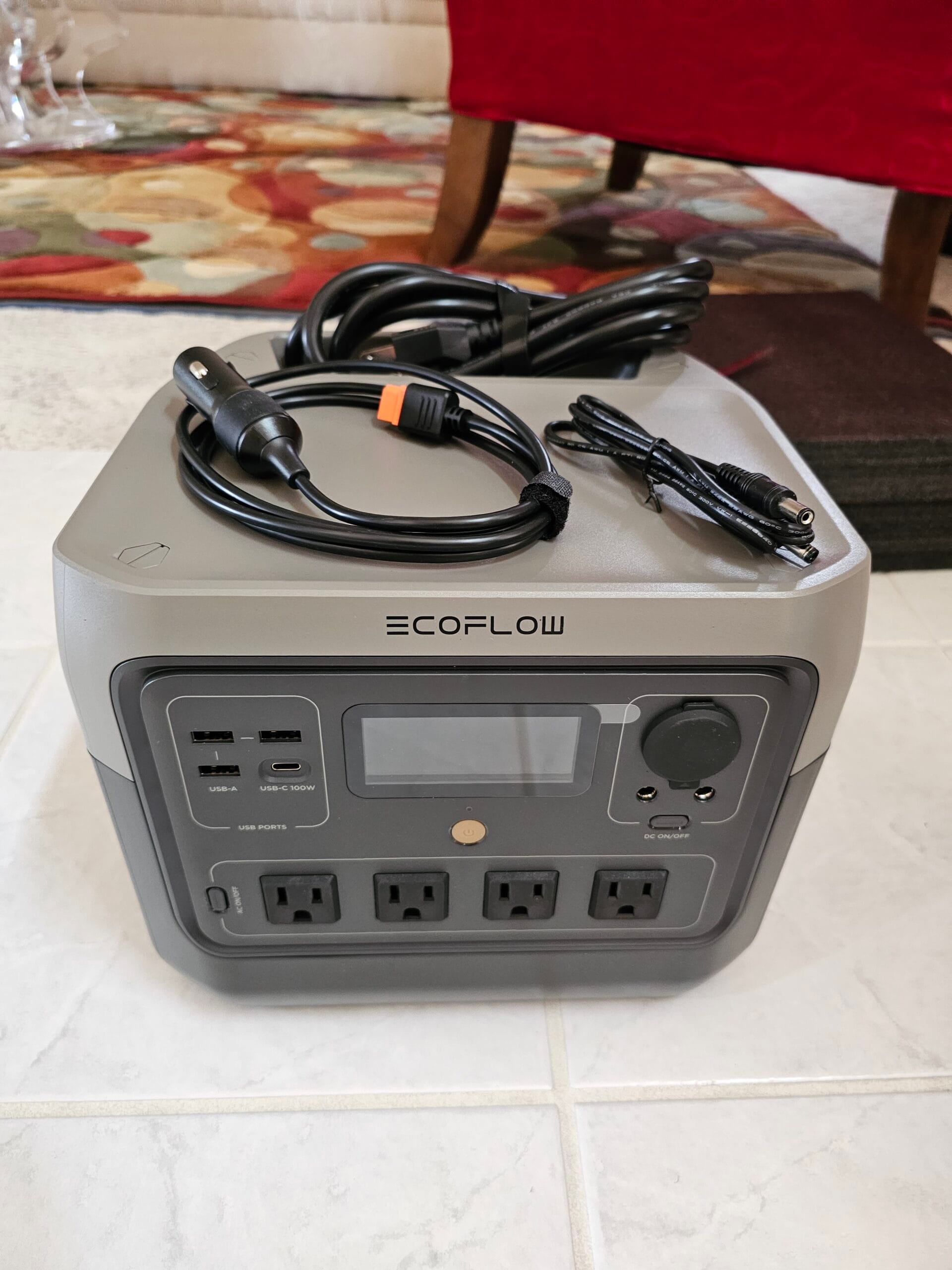
Note: This is an unaffiliated, honest review. I have no relationship with Ecoflow. I spent my own money on this.
To save you some time, here is the quick, no-BS verdict on the EcoFlow River 2 Pro: it is actually a solid piece of gear. It works well, the screen on the front is incredibly clean, and you can run the entire thing without ever touching a mobile app. But it also sounds like a jet engine when charging from the wall at full speed, and the cooling vents are so aggressively open that a dusty campsite will try to turn the inside of your expensive battery into a sandbox.
| The Good | The Annoying |
| ✓ Zero-app dependency (great front UI) | ✗ Screaming fan noise during fast AC charging |
| ✓ Dead-flat top doubles as a camp table | ✗ Wide-open vents invite campsite dust/sand |
| ✓ Highly efficient 100W USB-C port | ✗ Standard 12V car charging is painfully slow |
If you want an honest look at this thing without the usual sponsored affiliate fluff, here is my experience after living with it.
Why I Bought It (And What It Actually Does)
I didn’t buy this to power my home during an apocalypse. Obviously, a unit of this size isn’t going to do that. I bought this for casual, on-the-go use: car camping, road trips, and working remotely out of my trunk. My primary use cases are dead simple: running my laptop, keeping my phone charged, and occasionally powering some camp lights or a small 12V fridge.
For that kind of casual use, the 768Wh capacity is a sweet spot. It is light enough to toss in the back of my car (about 17.2 lbs) but has enough juice that I don’t have to constantly worry about running dry.
Also, a minor but highly underrated design win: the top surface of the unit is completely flat. There are no weird carry handles sticking up to waste space. This means it doubles as a handy little table to hold your phone, keys, or even a laptop while it’s charging. When you are living out of your car or working in a cramped tent, having an extra flat, rigid surface is incredibly convenient.
Under the hood, it uses LFP (Lithium Iron Phosphate) battery chemistry. This is a massive win because LFP batteries are rated for 3,000 charge cycles before the capacity drops to 80%. If you use this thing heavily, that is easily 10 years of life. The physical output specs are also decent: it handles an 800W continuous load and can surge up to 1600W. It’s more than enough for laptops, portable electronics, and small appliances.
Kudos to the Engineering Team (It Actually Lasts)
Before I get into the weeds, I want to give credit where credit is due: this piece of hardware has worked mostly without a single flaw for several years now.
In an era of planned obsolescence—where modern consumer tech is engineered to self-destruct or go completely out of support the second the warranty expires—having a battery pack that reliably boots up and does its job day after day is incredibly rare. Sincere kudos to EcoFlow’s design and engineering teams on that front. They built a tank.
The App, UI, and a Sneaky Useful Watt-Meter
One of my favorite things about the River 2 Pro is that it just works without an app.
So many modern tech products lock basic hardware functionality behind an app store download, a Bluetooth pairing sequence, and a mandatory request for your email address. EcoFlow has an app if you want to use it, but you don’t need it. The physical screen on the front is smooth, snappy, and gives you everything you actually care about in real-time: input wattage, output wattage, exact battery percentage, and remaining run time.
That real-time power reading is a stellar diagnostic tool. If you don’t already own a dedicated kill-a-watt meter, this screen tells you exactly how much power your electronics are consuming. I spent the first week plugging in random appliances and laptop chargers just to see their actual real-time draw.
That said, if you do decide to open the EcoFlow app, the experience is surprisingly polished. The UI is useful, highly responsive, and feels heavily inspired by Tesla’s clean, minimalist look and feel. It has clean cards, smooth transitions, a dark background, and real-time power flow animations showing exactly where the energy is coming from and going to. It’s easily one of the best companion apps I’ve used for a hardware product.
The 12V Car Port Surprise
One feature I honestly didn’t think I’d care about is the 12V car outlet (the classic cigarette lighter port). Turns out, it’s incredibly useful.
Anything you might normally run off your car’s utility port while driving—portable car vacuums, extra USB chargers, dashcams, or camera battery chargers—you can now run anywhere. It basically untethers your car accessories and lets you use them inside your tent, at a picnic table, or in your living room.
Charging Rates: The Custom Charge Speed Trick
I’ve charged this thing every which way—solar, wall outlets (AC), and the 12V car plug. Here is how they actually stack up in the real world:
1. AC Wall Charging (Fast, Loud, and My Workaround)
If you plug this into a standard home wall outlet, it charges from 0% to 100% in about 70 minutes at a blistering 940W max input. This is incredibly convenient when you are packing for a last-minute trip.
The catch? It makes an absurd amount of noise. The moment you start AC charging at maximum speed, the internal cooling fans kick into overdrive to handle the heat.
Because of this, I chose to go into the app and limit the AC charging speed. Dialing down the input wattage takes a bit longer to charge, but it supposedly protects the long-term battery life from unnecessary heat degradation, prevents overheating, and keeps the fans from screaming at you.
2. USB-C Charging (The Laptop Lifesaver)
One massive benefit of the River 2 Pro is the 100W USB-C Power Delivery port. The fact that the USB-C port is powerful enough to run a laptop directly at 100W means I don’t even have to switch on the main AC inverter to charge my computer. Running the DC-to-DC USB-C port directly avoids the efficiency losses of the AC inverter, saving a ton of battery life.
3. Solar Charging (Reasonable Expectations)
Off-grid, you can plug in solar panels to charge. The River 2 Pro has a 220W max solar input limit.
Some reviewers complain that this solar capacity is too low, but honestly, the point of this unit isn’t to be a heavy-duty home solar inverter. It’s a portable battery pack. For a 768Wh portable pack, a 220W limit is perfectly reasonable. In decent sun, a 220W panel can top this thing off in about 3.5 to 4.5 hours.
4. Car Charging: Standard 12V vs. Pricey Alternator Upgrades
Charging this from a standard 12V car cigarette lighter port is a test of patience. It maxes out at 100W and takes a brutal 9 hours to go from empty to full.
If you want fast charging in your car, EcoFlow sells an alternator charger accessory that taps directly into your vehicle’s battery system to charge it way faster. But that accessory is ridiculously expensive, and for most casual users, it is hard to justify the extra cost.
However, there is a cool, undocumented bonus: the battery capacity is technically expandable via that XT60 solar charge connector—though it is absolutely not officially supported. If you hook up an external 12V or 24V battery (like a cheap deep-cycle battery) to the solar port, it will trickle-charge the River 2 Pro’s main battery as you consume power. Again: do this entirely at your own risk. Don’t go crying to EcoFlow if you wire something backward and something bad happens, do your own research, but for the tinkerers out there, it’s a cool option to extend your runtime. Make sure whatever DC source you hook up falls safely within EcoFlow’s solar input limits so you don’t fry the charge controller. Each product has it’s own limits so look them up.
The Annoying Quirks
As much as I like the River 2 Pro, EcoFlow made a couple of design choices that could be improved:
- The Vents are Wide Open: Look at the cooling vents on the sides of the unit. They are aggressively open with mesh filtering. If you take this camping, dust, dirt, pine needles, and sand are inevitably going to find their way inside the chassis. I constantly worry about debris shorting something out over time.
- The Fan Noise Under Heavy Load: It’s not just noisy when charging via AC. If you pull a decent load from the AC outlets, the internal fans kick in and they get loud.
However, there is a silver lining here: when in use and temperatures are cool or reasonable, the unit is actually completely quiet and highly usable. If you’re just running a laptop, a phone charger, or low-wattage gear in normal weather, the fans stay off, and you can work in absolute peace.
A Note on Newer Versions
Keep in mind that the River 2 Pro is an older model at this point. EcoFlow is already churning out the River 3 series, so it’s entirely possible they’ve improved some of my gripes—like adding mesh to those gaping vents or quiet-tuning the fans—in their latest versions. (I checked and they have changed it slightly but they kinda went backwards on some other things, likely shifting sales to their Delta class models) If you have one of the newer models, leave a comment and let me know if they actually fixed those vents.
The Verdict
So, is the EcoFlow River 2 Pro worth it?
If you need a reliable, compact power station for weekend camping, road trips, or keeping your mobile office running from your car, yes, it is a great buy. The 768Wh capacity is highly usable, the 100W USB-C port is incredibly convenient, and the LFP battery means it will last for a decade of trips.
Just make sure to use the app to limit your AC charging speeds to save your battery (and your ears), and maybe keep a can of compressed air handy to blow the campsite dust out of those wide-open vents.
Hey, if anyone from EcoFlow, Bluetti, Jackery, or literally any other brand is reading this and wants me to review their latest gear, feel free to reach out via the comments.
Ecoflow, Bluetti, Jackery own their own respective copyrights.
All product names, logos, brands, and images are property of their respective owners. Brand names and imagery used in this blog post are strictly for identification, educational, and critical commentary purposes under the Fair Use doctrine of copyright law.
This review is for informational and entertainment purposes only. Individual results with this product may vary. Always follow the manufacturer’s safety instructions. The author assumes no liability for damages or injuries resulting from the use of this product
Leave a Reply